

Sciter之自定义头部导航栏
前言
Sciter 是一个高质量但小众的嵌入式 UI 引擎,适合追求性能、体积和原生集成的桌面应用开发者。
我觉得 Sciter 比较有意思,它很小众,是闭源的,商用需要许可。它是Andrew Fedoniouk开发维护,Andrew获得了物理学和应用数学硕士学位以及艺术文凭。他的职业生涯始于俄罗斯航空航天工业的研究员。这种跨领域背景使他既具备深厚的技术功底,又懂得用户界面设计的艺术。
Sciter官网:https://sciter.com/ 2025-11-15 sciter-js-sdk最新版v6.0.2.28
lingkang官网:https://lingkang.top/
本次入门开发环境:window 10 + Clion 2024.3 + Sciter-js v6.0.2.28(2025-11-15最新版) + Bundled MinGW 11.0
自定义头部导航栏
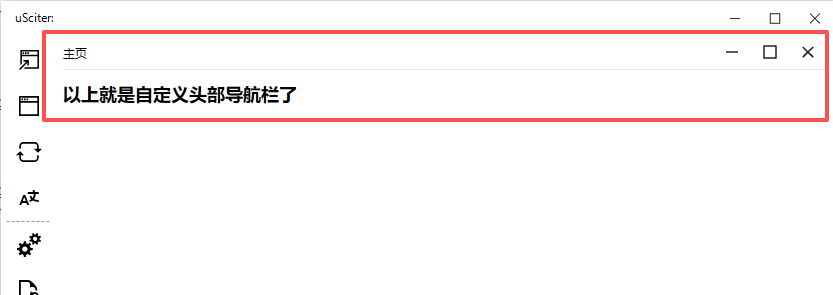
设置window-frame="solid-with-shadow" 后可以自定义头部导航栏,用于灵活设计窗口。
<!DOCTYPE html>
<html
        window-width="800px"
        window-height="600px"
        window-resizable="true"
        window-frame="solid-with-shadow"
>
<head>
    <meta charset="UTF-8">
    <title>自定义头部导航栏</title>
    <style>
        .flex-row {
            display: flex;
            flex-direction: row;
        }

        .lk-head {
            height: 30px;
            line-height: 30px;
            border-bottom: 1px solid #e5e6eb;
            margin-top: -3px;
            align-items: center;
        }

        .lk-head .lk-head-right svg {
            background: #fff;
            border: none;
            cursor: pointer;
            padding: 4px 10px;
            width: 18px;
            height: 18px;
            color: #1d2129;
        }

        .lk-head .lk-head-right svg:hover {
            background: #e5e6eb;
        }

        .lk-head .lk-head-right #window-close:hover {
            background: #F76560;
            color: #fff;
        }
    </style>
</head>
<body>
<div class="flex-row lk-head">
    <!--头像-->
    <!--<img width="28" height="28" style="margin-right: 5px" src="../img/logo.png">-->
    <div style="flex: 1" role="window-caption" id="title">主页</div>
    <div class="flex-row lk-head-right">
        <svg id="window-minimize" viewBox="0 0 480 480" xmlns="http://www.w3.org/2000/svg"
             title="最小化窗口">
            <path d="M80 260l320 0 0-40-320 0 0 40z"/>
        </svg>
        <svg id="window-maximize" viewBox="0 0 480 480" xmlns="http://www.w3.org/2000/svg" title="最大化窗口">
            <path d="M80 420l320 0q8 0 14-6 6-6 6-14l0-320q0-8-6-14-6-6-14-6l-320 0q-8 0-14 6-6 6-6 14l0 320q0 8 6 14 6 6 14 6l0 0z m20-40l0-280 280 0 0 280-280 0z"/>
        </svg>
        <svg id="window-close" viewBox="0 0 428 480" xmlns="http://www.w3.org/2000/svg"
             title="关闭">
            <path d="M90 390l120-120 130 120 30-30-130-120 130-120-30-30-130 120-120-120-30 30 120 120-120 120 30 30z"/>
        </svg>
    </div>
</div>
<script>
    document.getElementById('window-close').onclick = function () {
        Window.this.close()
    }
    document.getElementById('window-maximize').onclick = function () {
        if (Window.this.state !== 3) {
            Window.this.state = Window.WINDOW_MAXIMIZED;
        } else {
            Window.this.state = Window.WINDOW_SHOWN
        }
    }
    document.getElementById('window-minimize').onclick = function () {
        Window.this.state = Window.WINDOW_MINIMIZED;
    }
</script>
<h2>以上就是自定义头部导航栏了</h2>
</body>
</html>
效果
文章来源 https://lingkang.top